> For the complete documentation index, see [llms.txt](https://manual-en.seara.biz/llms.txt). Markdown versions of documentation pages are available by appending `.md` to page URLs; this page is available as [Markdown](https://manual-en.seara.biz/readme.md).
# System Overview
Describes how devices connect to the system and the overall workflow
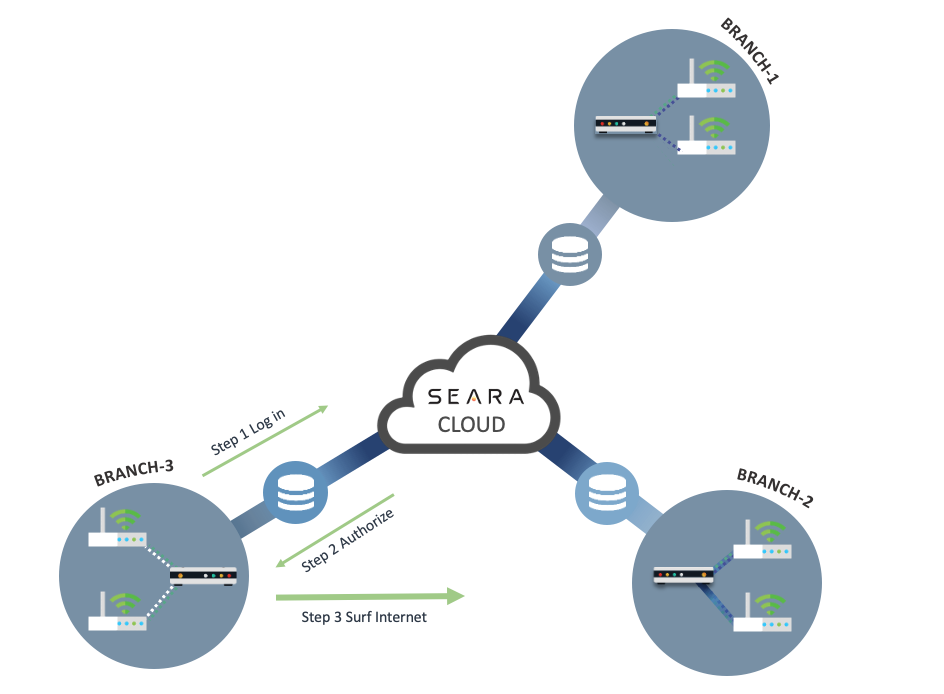
Diagram showing how the SEARA system works
SEARA is a Cloud RADIUS Server and WiFi Marketing Platform that lets service providers easily create Captive Portal pages to offer WiFi services to their users. Captive Portal pages can be managed separately by WiFi SSID. The system comes with various features that help collect user data which can be further leveraged for marketing. SEARA works together with network devices that support External Captive Portal and RADIUS Server configuration for invoking an external Captive Portal along with identity authentication via the RADIUS protocol. Supported devices include WiFi Access Points, WiFi Controllers, and Gateway Routers. You can check supported models from the [Appendix of devices supported with SEARA](/appendix/support-device.md)
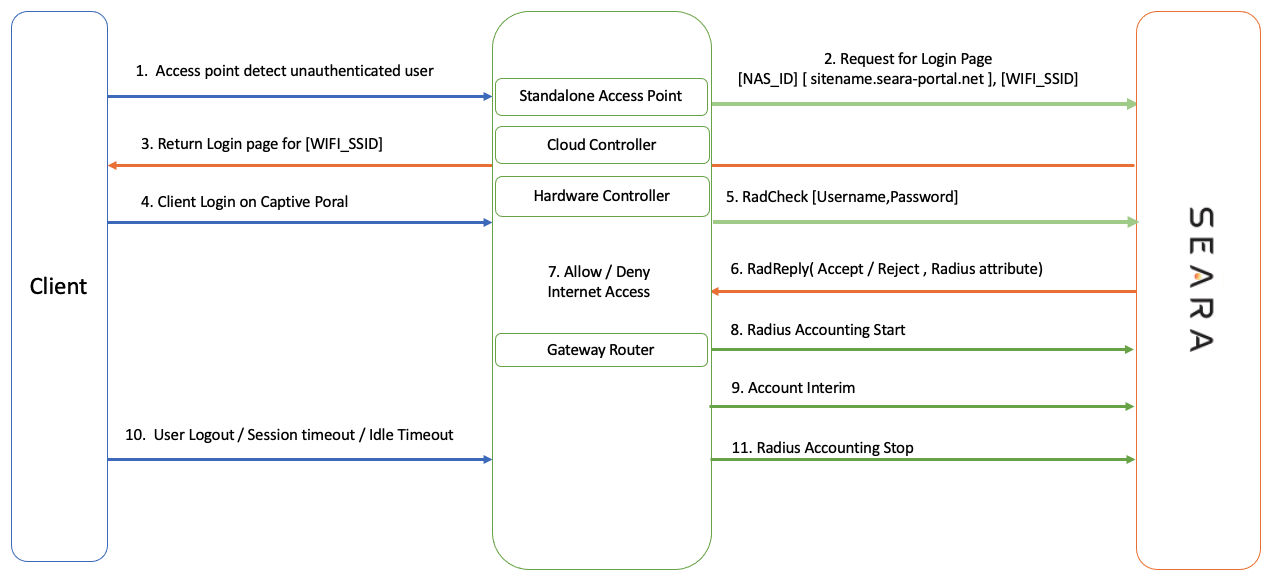
Connecting to SEARA can be done by configuring Access Point devices, working with a WiFi Controller (either Hardware Controller or Cloud Controller), or working with a Gateway Router such as Mikrotik. The workflow of the SEARA system together with various network devices is illustrated below.
SEARA workflow with various hardware devices
1. **Access Point detect unauthenticated user** The access point detects a user who has not yet authenticated to the system.
2. **Request for Login Page** The network device sends information to Seara Cloud, passing NAS\_ID, sitename, and WiFi SSID name to Seara Cloud.
3. **Return Login Page** Seara Cloud returns the Login Page based on the WiFi SSID name.
4. **Client Login on Captive Portal** The user logs in by entering their username and password, or authenticates via OAuth when logging in with a Social Network such as Facebook, Line, or Twitter.
5. **RadCheck** The network device sends the username and password to Seara Cloud using the RADIUS protocol.
6. **RadReply** Seara Cloud responds whether to Allow access or Reject, together with various attributes such as allocated Bandwidth and allowed session duration.
7. **Allow/Deny Internet Access** The device allows or denies access to the system.
8. **Radius Accounting Start** Stores transaction data for the session, including login time, IP, and MAC address of the device.
9. **Account Interim** Sends client data updates while the user is online in the system.
10. **User Logout / Session Timeout/Idle Timeou**t After the user logs in, they can be disconnected from the system via Logout or Timeout due to inactivity.
11. **Radius Accounting Stop** Closes the user's transaction record in the system.